Skip to Content
AI360 Enroll · Creating Activities and Prices

AI360 Enroll · Creating Activities and Prices

Step-by-step guide to create activities, link them to their offer (school and campaign) and set the price in the enrolment form. Includes public form verification.
Responsible 360 group
Last Update 09/25/2026
Members 4
Introduction
Introduction
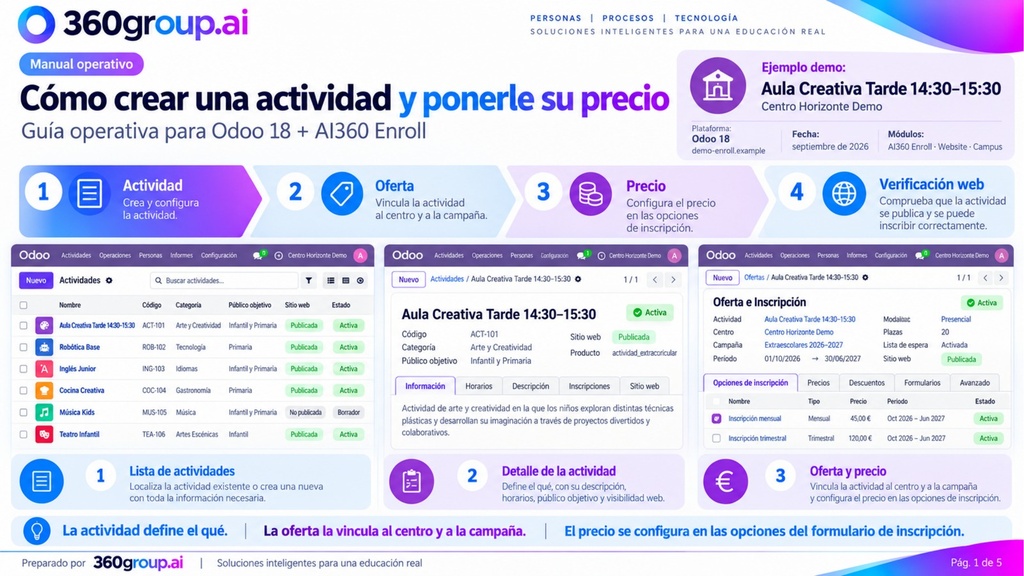
Guía operativa para Odoo 18 + AI360 Enroll: crea la actividad, vincúlala a su oferta (centro y campaña), configura el precio en el formulario de inscripción y verifícalo en la web.
New Content
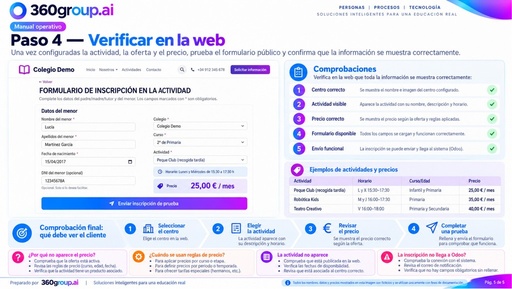
Step 4 — Verify on the website
Preview
Comprueba en el formulario público que el centro, la actividad y el precio son correctos y que el envío funciona.
New Content
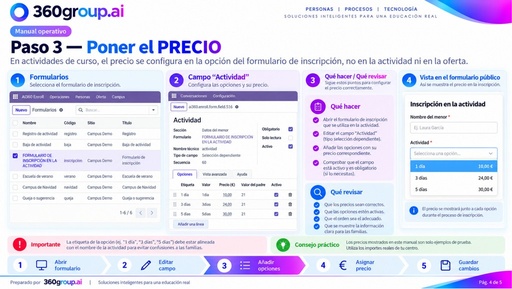
Step 3 — Set the price
Preview
Configura el precio en las opciones del campo «Actividad» del formulario de inscripción (1, 3 y 5 días).
New Content
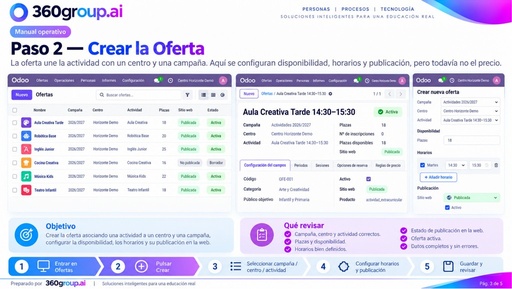
Step 2 — Create the Offer (school and campaign)
Preview
Vincula la actividad al centro y a la campaña: plazas, horarios y publicación. Aquí no se pone el precio.